

A practical guide to NDIS software for sole traders, matched to how your participants’ funding is managed and whether you’re registered, rather than to a feature list built for a team you don’t have.
Search “NDIS software for sole traders” and most results read the same way: a feature list built for a twenty-person organisation, with “scales down for solo operators” tacked on as an afterthought. That framing gets it backwards. What you actually need has very little to do with your headcount. It comes down to a handful of concrete facts about your business: whether you’re a registered or unregistered NDIS provider, and how the participants you support have their funding managed. Get those two answers right and the shortlist writes itself.
“Sole trader” and “independent support worker” aren’t quite the same question
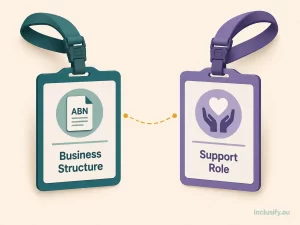
The two terms get used interchangeably, and that’s part of what makes shopping for software confusing. Sole trader is a business structure: you operate under your own ABN, without a company or trust sitting between you and your work. Independent support worker describes a role, not a structure, and it covers people in genuinely different positions.
Some independent support workers are sole traders who hold their own NDIS provider registration, or who operate unregistered and invoice participants or plan managers directly. Others are contracted to a marketplace platform or subcontracted to an agency that holds the registration on their behalf, which means the compliance obligations sit with that platform or agency rather than with the worker.
This article is written for the first group: sole traders who hold their own ABN and deliver NDIS supports directly to participants, whether registered, unregistered, or still deciding. If you’re working under someone else’s registration, most of what follows about compliance and claiming software won’t apply to you directly, because those obligations belong to whoever’s registration you’re operating under.
The one variable that actually decides what you need
Before comparing feature lists, there’s a single question worth answering first: how is your participants’ funding managed? It determines who you invoice, how you get paid, and whether you’re even allowed to work with a given participant at all.
According to NDIS guidance on choosing a provider, participants must use a registered provider for NDIA-managed funding. If their plan is self-managed or plan-managed, they can usually choose either a registered or unregistered NDIS provider, though some specific supports remain registration-only regardless of funding type.
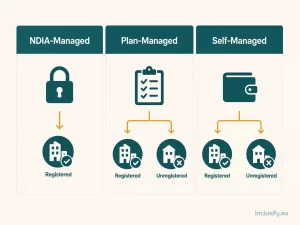
- NDIA-managed participants. You must be a registered NDIS provider to be paid, and claims are lodged through the NDIA’s own claiming system. If most of your caseload sits here, bulk claim submission that matches the NDIS Price Guide isn’t optional software polish; it’s the mechanism your income depends on.
- Plan-managed participants. You can operate registered or unregistered. Your invoice goes to the participant’s plan manager, who pays you from a separate trust account on the participant’s behalf. What matters here is invoicing accuracy against NDIS price limits, not portal integration.
- Self-managed participants. Same registration flexibility as plan-managed, but the participant themselves is the one signing off and paying your invoice directly. Clear, professional invoicing matters even more here, because the participant is doing their own reconciliation.
Most sole traders serve a mix, which is exactly why this matters. The invoicing and claiming capability you need is a function of who’s on your caseload, not a fixed requirement every NDIS software product should have baked in the same way.
Registered or unregistered: what actually changes for your compliance load

Registration status changes who checks your work, not how much of the underlying compliance obligation exists. As a sole trader, this is worth understanding precisely, because it directly shapes what “NDIS compliance software” needs to do for you.
The NDIS Quality and Safeguards Commission is explicit that self-employed or sole trader registered providers are both key personnel and working in a risk-assessed role. This means an NDIS worker screening clearance is mandatory before you can register, not something that only applies once you employ someone else.
Unregistered providers sit differently: the Commission recommends, but does not legally require, that unregistered sole traders hold worker screening. Many self-managed and plan-managed participants will still expect to see one before they engage you, so treating it as optional is a commercial risk even where it isn’t a legal one.
The Commission also confirms that an unregistered provider may be an entity, sole trader, or subcontracted worker, and that registered providers, sole traders included, must meet the same NDIS Practice Standards as larger organisations. The scale of your operation is smaller; the standard you’re held to is not.
Practically, this means an unregistered sole trader still benefits from software that tracks screening and insurance renewal dates, logs incidents properly, and keeps service agreements organised, even without an audit forcing the issue. A registered sole trader needs the same tools with less room for anything to slip, because an auditor will eventually ask to see it.
The toolset every sole trader actually needs

Strip away the registration and funding-type differences and a consistent baseline remains. This is what belongs in NDIS software for sole traders regardless of which category you fall into.
- Participant records that don’t live in your head or a paper folder. Support plans, risk notes, consent details, and key contacts, stored somewhere searchable and backed up, not scattered across a phone, a filing cabinet, and memory.
- Digital service agreements. Generated with the correct details, stored centrally, and easy to reissue when something changes. A lost paper agreement is a genuine compliance gap, not just an inconvenience.
- NDIS-compliant invoicing. Correct support item numbers and NDIS Price Guide limits applied automatically, whichever direction the invoice flows: to the NDIA claiming system, a plan manager, or a participant directly.
- Incident and complaint logging. A simple, consistent way to record what happened, what you did about it, and how it was resolved. Non-negotiable for registered providers at audit, and sound practice regardless of registration status.
- Compliance tracking for yourself. Visibility over your own worker screening expiry, insurance renewal, and any registration conditions. As a sole trader there’s no compliance team behind you catching a missed date, which makes a simple reminder the difference between renewing on time and lodging late.
What you probably don’t need yet
The flip side of that baseline is just as important. A genuine amount of what NDIS software vendors sell is built for organisations with a workforce to manage, and paying for it as a sole trader buys you complexity without capability.
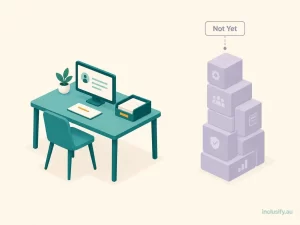
Shift rostering across a team, multi-site location controls, and layered role-based permissions all solve problems that only exist once there’s more than one person delivering support under your ABN. As a sole trader, you are the roster. Software that makes you configure a permissions structure for staff you don’t have is adding a learning curve, and often a price tier, for something you’ll never touch.
This is where matching the tool to your actual operation matters more than matching it to the biggest feature list. Inclusify’s platform is built around this idea: providers switch on the participant, funding, and compliance modules relevant to their operation rather than being sold a fixed bundle sized for an organisation. See current pricing for how that’s structured.
The moment this changes: when you bring on a second person
Plenty of sole traders eventually take on help, whether that’s subcontracting overflow work to another independent support worker or formally hiring someone. The moment you do, your compliance profile changes even if your business structure doesn’t.
You become responsible for making sure anyone delivering supports under your registration meets the same worker screening and conduct obligations you do. If you move from sole-trader invoicing to actually employing someone, award and pay compliance enters the picture too, and that’s a different, detailed problem worth understanding properly rather than guessing at.
We’ve covered the payroll side of that transition in detail. It includes how SCHADS Award obligations apply once you’re paying wages rather than invoicing as an individual, in Best Payroll Software for NDIS Providers with Complex Awards.
The practical takeaway for software selection is this: look for a platform that lets you add a second worker, a subcontractor, or basic rostering as a module you switch on. Avoid one that requires migrating to an entirely different product once you’re no longer working alone.
NDIS Software for Sole Traders: A Practical Checklist
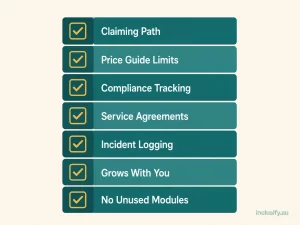
Bringing it together, here’s what to actually check before you commit to a platform.
- Confirm it handles your actual claiming path: NDIA bulk claims if you have NDIA-managed participants, clean plan-manager invoicing if you don’t.
- Check it applies current NDIS Price Guide limits automatically, rather than leaving you to check rates manually on every invoice.
- Look for compliance tracking on your own worker screening and insurance, with reminders ahead of expiry, not just a static record.
- Confirm digital service agreements and participant records are stored centrally and searchable, not just exportable as PDFs you still have to organise yourself.
- Check incident and complaint logging exists and is simple enough that you’ll actually use it consistently, not just during audit preparation.
- Ask whether pricing and features scale with a second worker or subcontractor, or whether growth means switching products entirely.
- Avoid paying for rostering, multi-site, or role-based permission tiers you won’t use as a one-person operation, at least until you actually need them.
Getting the match right, not the biggest feature list
The right NDIS software for sole traders isn’t the option with the most features. It’s the one that matches your specific setup: your registration status, your participants’ funding mix, and your current team size of one. And it leaves room to add capability without switching platforms the moment your business grows.
That’s the logic behind how Inclusify’s platform is put together: compliance, funding, and participant modules a sole trader can turn on individually. It’s the same platform you’d grow into if you bring on a second worker, rather than a separate product you’d need to migrate to later.