


how to choose NDIS software when every demo looks impressive and every vendor claims to be built specifically for providers like you.
Twenty minutes into a demo, the sales rep clicks through a dashboard that shows rostering, claims, incident reports and a participant portal all glowing in the same shade of teal, and it looks like exactly what the business needs. The problem is that every vendor’s demo looks like this, and a list of NDIS provider software features tells you almost nothing about which platform actually fits your operation. The dashboard tells you almost nothing about how to choose NDIS software that will actually survive contact with your rosters, your award interpretation, and your next Practice Standards audit. This guide sets out the questions that matter more than the feature list, in the order they should actually be asked.
Start With What You’re Actually Being Audited On
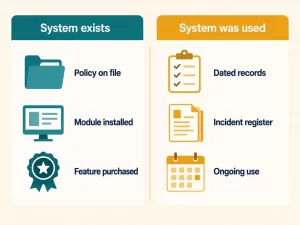
Most software searches start with a feature wishlist. A better starting point is your own compliance evidence trail, because that’s what a renewal audit actually tests. The NDIS Quality and Safeguards Commission assesses renewal applications against a self-assessment and supporting evidence of your ability to deliver the supports you’re registered for, not against a vendor’s marketing claims.
In practice, that means an auditor wants to see that systems were actually used, not just that they exist. A platform with a beautiful incident reporting module is worth nothing if nobody in the business can produce a dated, attributed incident register going back through the registration period. When people search for NDIS compliance software, what they actually need is evidence handling that survives an audit, not a compliance badge on a pricing page. Before evaluating any vendor’s feature list, write down what your last audit actually asked for, or what you expect the next one to ask for if you haven’t been through one yet, and test every shortlisted platform against that list specifically, not against a generic “compliance” checkbox on a pricing page.
Award Interpretation and Payroll: The Detail That Breaks Generic Systems
Generic rostering and payroll software, the kind built for retail or hospitality and repackaged for disability support, tends to fall over on SCHADS Award specifics: broken shifts, minimum engagement periods, and sleepover versus active night allowances. We’ve covered the payroll side of this in detail in our piece on payroll software for NDIS providers, and the rostering side in our time-audit guide to what manual scheduling actually costs. The evaluation question here is narrow and specific: ask any vendor to show you, live, what happens on screen when a shift is split into two visits with a gap between them. If the answer is a shrug or a promise that it’s “on the roadmap,” that’s the answer to how to choose NDIS software well, because this is exactly the scenario that generates underpayment risk when it’s handled manually or half-automated.
Rostering and Workforce Visibility

Ask to see how the platform handles a same-day cancellation, not a scheduled build. Every vendor can show you a clean weekly roster built two weeks in advance with no complications. Far fewer can show you, in the demo itself, what a coordinator sees on screen forty minutes after a support worker calls in sick for a shift starting in three hours: does the system surface who’s qualified and available, or does the coordinator still need to check a separate spreadsheet and make phone calls to find out? This single scenario tells you more about day-to-day fit than an hour of scrolling through feature lists.
Field Access: Whether the Platform Works Where the Support Actually Happens
Everything evaluated so far assumes someone sitting at a desk with a stable connection. Most disability support isn’t delivered at a desk. It happens in a participant’s home, on a community outing, sometimes somewhere with no reliable signal at all, and the person who needs to log a shift note is standing in that location with their phone, not back at the office.
Test this directly rather than accepting “our app is fully mobile” as an answer. Hand the trial to someone doing an actual home visit or community access outing, ideally somewhere the office wouldn’t normally think to check for coverage, and watch what happens when they try to log a shift note at the end. Does the note save locally and queue to sync once reception returns, or does it simply fail and get lost if the connection drops mid-entry? A platform that quietly assumes good signal everywhere is designing for the office, not for the actual shift, and that gap doesn’t show up until a worker is standing in a participant’s driveway with nothing to show for an hour of documentation.
Claims and Invoicing Accuracy
A platform’s claims and invoicing function needs to be evaluated on how it handles the exceptions, not the standard case. Every system can submit a claim for a support that was delivered exactly as planned. What separates a genuinely useful platform is how it handles a cancelled shift, a partially delivered support, or a claim that needs to reference a specific line item after a plan review. Ask to see an example of each during the evaluation, because this is where billing errors and delayed payments actually originate, not in the straightforward claims nobody worries about.
Data Security and Privacy: What “Secure” Should Actually Mean

Every vendor will tell you their platform is secure. Under Australian Privacy Principle 11, an organisation holding personal information must take reasonable steps to protect it from misuse, interference, loss, unauthorised access, modification and disclosure. “Reasonable steps” is deliberately not a fixed checklist, which means the burden is on you to ask specific questions rather than accept a general assurance.
Ask where participant data is actually hosted, who at the vendor can access it and under what circumstances, what happens to your data if you cancel the contract, and whether the platform has been through any independent security review. A vendor that answers these specifically and quickly is telling you something different than one that redirects you to a generic trust page. Given how much of what a support worker records, a participant’s health information, behaviour support strategies, incident details, is sensitive information under the Privacy Act, this isn’t a box-ticking exercise. It’s one of the highest-stakes parts of the decision.
Fit for Your Scale, Not Someone Else’s
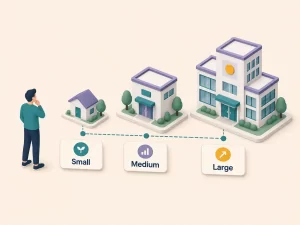
A platform built primarily for large multi-site organisations will often bury a sole trader in workflow steps designed for a team of forty. A platform built primarily for sole traders will often lack the role-based permissions a growing team needs the moment a second coordinator comes on board. Neither is a bad platform; both are a bad fit outside their intended scale.
This is worth naming directly rather than assuming the biggest feature list wins. Inclusify structures its pricing around this exact problem, with separate tiers for sole traders, small teams, and established multi-site providers, because the workflows that matter change meaningfully at each scale. Whichever platform you’re evaluating, ask specifically how its workflow changes between a one-person operation and a fifty-worker team, and whether that change happens through genuinely different tooling or just a higher price on the same interface. You can see how Inclusify’s tiers map to this on our pricing page.
Vendor Stability: What Happens If They Don’t Make It
Every question above assumes the vendor will still exist in two years. That’s not guaranteed in this market. Smaller platforms serving the NDIS sector have folded or been acquired mid-contract before, sometimes leaving providers with only a few weeks’ notice to migrate everything again, this time without the luxury of a calm, planned switch. This is a different risk to the one covered below: switching costs are about what happens when you choose to leave a platform. This is about what happens when the choice gets made for you.
Ask directly how long the vendor has operated specifically in the NDIS market, not software generally, and what their funding position looks like if that information is available. Ask what contractual notice you’d get if the company changed hands or ceased trading, and get that notice period written into the agreement rather than accepted as a verbal assurance. A newer vendor isn’t automatically the wrong choice, and a long-established one isn’t automatically safe either, but going in without asking the question at all is how a provider ends up doing a forced, rushed migration instead of a planned one.
Switching Costs: Data Migration and the Messy Middle
The part of switching NDIS software that vendors talk about least is the two or three weeks in the middle, after the old system is switched off and before the new one is fully trusted, when a roster gets built twice just in case, and everyone is a little slower than usual while they learn where things live. This period is real, it costs real hours, and pretending it won’t happen is how a rollout goes badly.
Ask any shortlisted vendor three specific questions: what exactly gets migrated automatically from your current system versus what you’ll need to re-enter by hand, whether historical records (past shift notes, incident reports, claims history) come across or stay locked in the old platform, and what support is available in the first fortnight specifically, not just the general onboarding package. A vendor who has a clear, specific answer to all three has done this migration before. A vendor who talks in generalities about being “here to help” probably hasn’t thought through what actually breaks during a switch.
The Evaluation Criteria at a Glance
Before running the five-step process below, use this as a quick reference against every vendor you’re seriously considering. Each row is the specific thing to ask or test, and the answer that should make you pause.
| Evaluation area | What to test | Answer that’s a red flag |
| Compliance evidence | Ask to see a dated, exportable audit trail for a specific shift or incident, produced live. | Can’t produce it without manual reconstruction from memory or spreadsheets. |
| SCHADS award interpretation | Ask the vendor to show, live, a shift split into two visits with a gap between them. | A shrug, or a promise that it’s “on the roadmap.” |
| Rostering visibility | Ask what a coordinator sees on screen forty minutes after a sick call. | Still needs a separate spreadsheet or phone calls to find cover. |
| Field access | Log a real shift note from an actual home visit in an area with weak signal. | The note fails or is lost instead of queuing to sync later. |
| Claims and invoicing | Ask to see a cancelled shift and a disputed claim line actually processed. | Only the standard, uncomplicated claim is demonstrated. |
| Data security and privacy | Ask where data is hosted, who can access it, and what happens to it on exit. | Redirected to a generic “we take security seriously” page. |
| Fit for your scale | Ask how the workflow genuinely changes between a 1-person and a 50-worker team. | Same interface throughout, just a higher price tag. |
| Vendor stability | Ask for a written notice period if the company is sold or ceases trading. | Notice period is promised verbally but not in the agreement. |
How to Choose NDIS Software: Running an Actual Evaluation
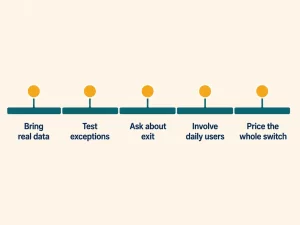
Once you’ve narrowed the field using the criteria above, run the same structured NDIS software comparison against every finalist rather than judging each one on a different demo. Think of the five steps below as an NDIS software evaluation checklist you apply identically to every shortlisted vendor, because the comparison only means something if every vendor is answering the same questions.
- Bring your own data. Ask to trial the platform with a real, recent week from your actual roster, not a sample dataset the vendor has optimised to look clean.
- Test the exceptions, not the happy path. Walk through a same-day cancellation, a broken shift, and a disputed claim line, the scenarios covered above, with each vendor doing the same walkthrough.
- Get a straight answer on data ownership and exit. Ask, in writing, what happens to your data and your history if you leave the platform in two years. A vendor confident in their product will answer this without hesitation.
- Involve the people who’ll use it daily, not just the person signing the contract. A coordinator or support worker will spot a workflow problem in the first five minutes that a decision-maker evaluating from a feature list would never catch.
- Price the whole switch, not just the subscription. Add migration time, training time, and the productivity dip during the messy middle to the sticker price before comparing platforms on cost.
- Test in the field, not just in the office. Have someone log a real shift note from an actual home visit or community outing during the trial, and ask every vendor the vendor-stability and exit-notice questions above before signing anything.
Frequently Asked Questions
How do I know if it’s actually time to switch NDIS software?
The clearest signal isn’t a single missing feature, it’s a pattern of workarounds: spreadsheets bolted onto the existing system to cover gaps, staff avoiding a module because it doesn’t reflect how the team actually works, or the same manual double-checking happening every week because nobody trusts the platform’s output. If your team has built more than one informal workaround to cope with the current system, that’s usually a stronger signal than any individual feature request.
What should I prioritise if I can only evaluate one thing properly?
Compliance evidence handling. A platform that’s slightly clunky day to day but produces a clean, complete, auditable record is a manageable inconvenience. A platform that’s pleasant to use but leaves gaps in your evidence trail creates risk that only becomes visible at your next audit, when it’s too late to fix retroactively.
Should I choose software built specifically for NDIS providers, or a general workforce management platform?
A general platform can look cheaper and more polished, but it usually won’t understand SCHADS Award specifics like broken shifts and sleepover allowances, or NDIS-specific claims and reportable incident workflows, without significant manual workarounds. For most registered providers, that gap outweighs the polish of a generic tool.
How long should a proper software evaluation take?
Long enough to run a real trial with your own data through at least one full roster cycle, typically two to four weeks per shortlisted vendor. Rushing this to meet an internal deadline is how providers end up locked into a platform that looked fine in a one-hour demo and turns out to be a poor fit in week three.
Is the cheapest NDIS software usually the best value?
Rarely, once migration time, training time, and the cost of any compliance gap are factored in. A slightly higher subscription on a platform that fits your actual scale and evidence needs is usually cheaper over two years than a low-cost platform that needs to be replaced again once it stops fitting.
Does NDIS software need to work without reliable internet reception?
It needs to handle poor reception gracefully, which is different from working fully offline. At minimum, a shift note started with no signal should save locally and sync automatically once reception returns, rather than being lost. Test this directly during a trial rather than accepting a general “mobile-friendly” claim, since this is exactly the kind of detail that only shows up in real field conditions.
What happens if an NDIS software vendor goes out of business?
Without a contractual notice period, you could be left with very little warning to migrate your data and workflows elsewhere. Ask any vendor directly how long they’ve operated in the NDIS market, and get their commitment on notice periods for a change of ownership or closure written into the service agreement, not left as a verbal assurance during the sales process.

The Bottom Line
Knowing how to choose NDIS software comes down to testing exceptions instead of admiring dashboards: the same-day cancellation, the broken shift, the disputed claim line, the audit that asks for evidence you didn’t think to keep. Any platform can look good demonstrating its best case. The one worth switching to is the one that still looks good when you throw your worst week at it.